Le Mans Ultimate overlays
Pitlane HQ Agent draws its overlays on top of Le Mans Ultimate, read from the game's own data. They are see-through, every click goes to the game, and they open by themselves when you get in the car.
The overlays
Relative
The cars ahead and behind on track with the gaps, their trend, the colours of each class and +1L / −1L, made for multiclass races.
Standings
Overall and by class, the gaps, the last laps and each driver's pace against yours.
Radar
The cars beside and behind you, with a red side bar and the nearest distance.
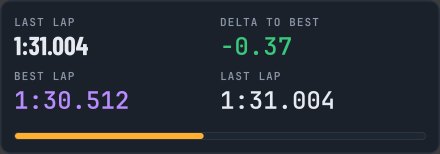
Delta bar
Your gap to your best lap, metre by metre, and the lap this pace gives.
Fuel
What each lap uses and what you may use per lap to finish without a stop.
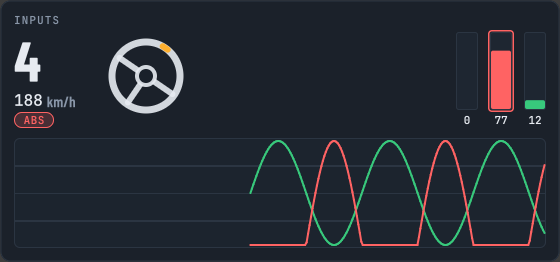
Dash
Gear, speed, revs, the pedals, TC, ABS, engine map, brake bias and the virtual energy and battery left.
Track map
Every car on the track coloured by class, the turns and the sectors.
Flags
The start lights, the flags and the laps to go.
Timing
The official sectors of the lap in purple, green or yellow.
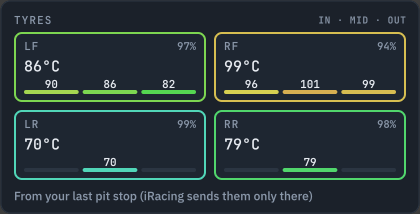
Tyres
Temperatures inside, middle and outside, and the pressure.
Pit stop
Your speed on the pit road and whether the pit limiter is on.
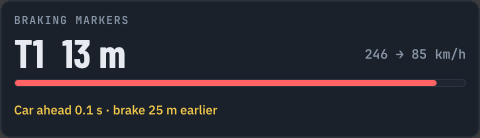
Braking markers
Where to brake in each corner, from the next level above your best lap.
Coach
The next corner's tip and braking point while you drive.
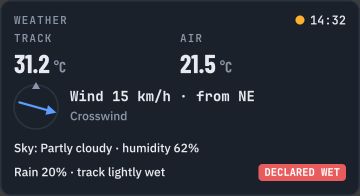
Weather
Track and air temperature and the wind against your car.
Track position bar
Every car along the lap on one line, coloured by class.
As Pitlane HQ Agent draws them


Experimental overlays
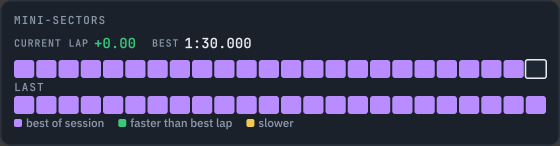
Live lap compare, DRS and push-to-pass, g-force, mini-sectors, gaps, session stats, telemetry traces and performance (frames a second, CPU, GPU and latency). Switch them on in the Overlays tab.
Overlays in VR
Every open overlay also shows in the headset as a SteamVR overlay, where it sits on your screen, so moving it on the screen moves it in VR. Meta headsets work through SteamVR. Turn it on in Settings → VR.
How they work
- Drawn natively by Pitlane HQ Agent on Windows, not in a browser window.
- Only the panel shows. The rest is see-through and every click goes to the game.
- Drag and resize them while you place them. They never leave the screen.
- Four presets built in, and your own, saved in your account.
- Six looks, Lane, Wall, Light, Board, Frameless and Classic, for every overlay or a different one for each.
- Each overlay has its own opacity, text size and rows, and can hide by itself in the pits or when you are out of the car.
- Auto opens them when you get in the car and closes them when you get out.
Questions
Are there free Le Mans Ultimate overlays?
Yes. The basic overlays are free, and during the beta everything is.
What do I need to install?
Only Pitlane HQ Agent on Windows. In the game, turn on Settings → Gameplay → Enable Plugins.
Do they work in VR?
Yes. Every open overlay also shows in the headset through SteamVR.
Is there a fuel calculator?
The fuel overlay is not a calculator you fill in. It measures each lap and shows what you may use per lap to finish without a stop, and the dash shows the virtual energy left.
Racing in iRacing too? iRacing overlays →
What is Pitlane HQ
Pitlane HQ (also written PitlaneHQ) is a free sim racing telemetry app for Le Mans Ultimate and iRacing. It is in beta, and everything in it is free during the beta.
Pitlane HQ Agent runs on the Windows PC where you race, and it is also on the Microsoft Store. It records every lap by itself and draws overlays on top of the game, also in VR. The web app and the Android app show your laps with a lap analyzer, lap comparison, sectors and braking points, and a coach that learns from real laps, shows corner by corner where you lose time and gives a plan marked on the track map.
Every lap syncs to your account with your whole history. Pitlane HQ also has live telemetry on your phone, race summaries with the fuel of each stint, leaderboards by car and track, friends, leagues and a Discord bot.