Where do I lose time in iRacing?
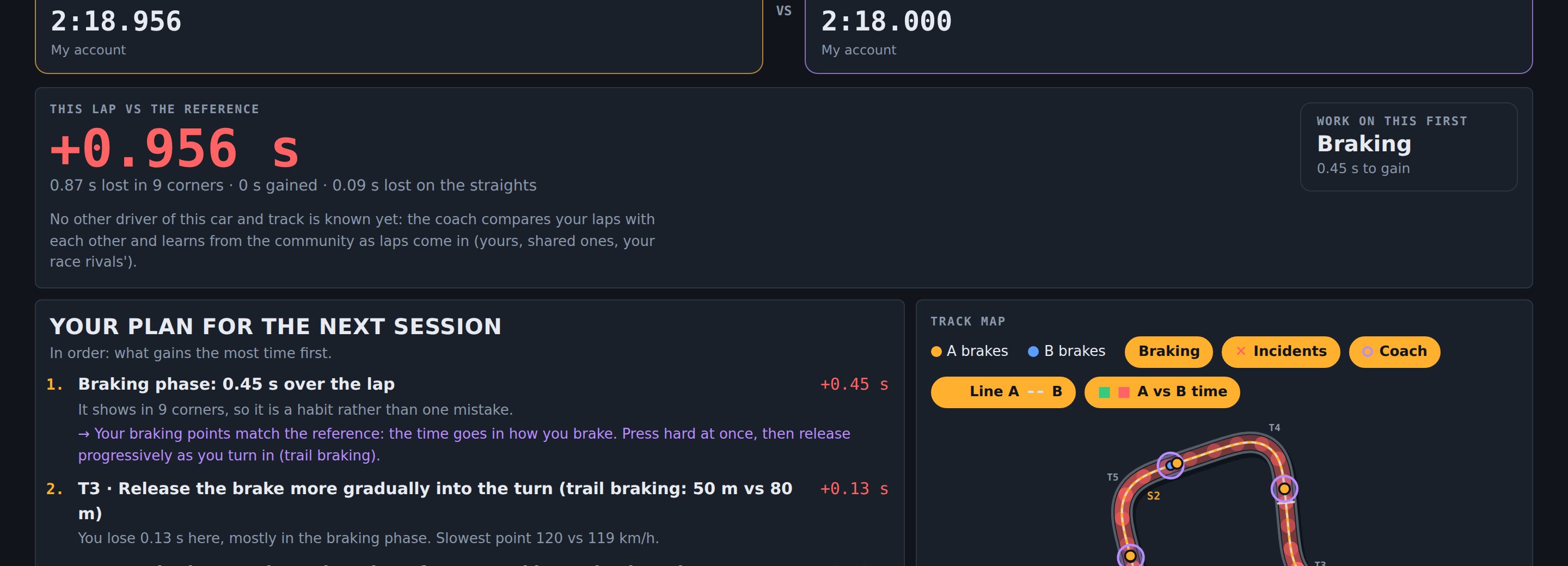
The lap time alone does not say where the time went. Pitlane HQ lays your lap over a faster lap of the same car and track and shows, corner by corner, how much each one cost and why.
The time gap along the lap
A line that rises where you lose time and falls where you gain it. The steep parts are the corners to look at, and the flat parts are fine as they are.
The corners in order of cost
Each corner has its loss in tenths, the most expensive first, so you work on two or three corners and leave the rest.
Why that corner costs time
Braking too early or too long, too little speed at the apex, a late throttle, another gear or another line. The coach names the cause it sees in the data of both laps.
Against a lap you can reach
The reference can be the driver just ahead of your pace, not only the record. A lap half a second faster shows changes you can make today.
Losses that repeat
Over a session the coach finds the same mistake in several corners, such as lifting too early everywhere, and the corners where your times vary the most.
In races too
The race summary shows your pace against the cars that finished around you, the laps lost to incidents and the time spent in the pits.
Racing in Le Mans Ultimate? A Le Mans Ultimate coach with real reference laps →
Questions
How do I find where I lose time in iRacing?
Record your laps with Pitlane HQ Agent, open Analysis and compare your lap with a faster one. The coach lists the corners by the time each one cost.
Do I need to export telemetry files?
No. Pitlane HQ records every lap by itself while you drive. There are no files to save or load.
Who is the faster lap from?
From a real driver on the same car and track, the record or the next level above your pace. You can also compare two of your own laps.
Is it free?
Yes.
Does it work in Le Mans Ultimate?
Yes. It works the same in Le Mans Ultimate.
Guides
- An iRacing coach that uses real laps
- Compare two iRacing laps
- Braking points for iRacing
- Your racing line in iRacing
- Your iRating and licence in every discipline
- A shift beep for iRacing
- Your iRacing telemetry on the phone
- Free telemetry for iRacing and Le Mans Ultimate
- An iRacing fuel calculator that measures every lap
- iRacing overlays
- iRacing leagues
- iRacing lap records by car and track
- iRacing telemetry and a coach for your laps
What is Pitlane HQ
Pitlane HQ (also written PitlaneHQ) is a free sim racing telemetry app for Le Mans Ultimate and iRacing. It is in beta, and everything in it is free during the beta.
Pitlane HQ Agent runs on the Windows PC where you race, and it is also on the Microsoft Store. It records every lap by itself and draws overlays on top of the game, also in VR. The web app and the Android app show your laps with a lap analyzer, lap comparison, sectors and braking points, and a coach that learns from real laps, shows corner by corner where you lose time and gives a plan marked on the track map.
Every lap syncs to your account with your whole history. Pitlane HQ also has live telemetry on your phone, race summaries with the fuel of each stint, leaderboards by car and track, friends, leagues and a Discord bot.